Sofa Time Offers a Smarter Way to Track Movies and TV Shows
Keeping track of movies and television shows has become increasingly complicated as streaming services continue to expand their libraries. Viewers often switch between platforms to find new releases, follow ongoing series and revisit favourite films. However, managing this viewing activity across multiple subscriptions can quickly become confusing.
Each streaming service generally maintains its own viewing history and recommendations. As a result, users who subscribe to several platforms may struggle to remember which episodes they have watched, where they stopped a series or which films they intend to watch next.
The problem becomes more noticeable when television seasons are released months apart. Without a central record, viewers may forget important details or spend time searching through different applications to find their next episode.
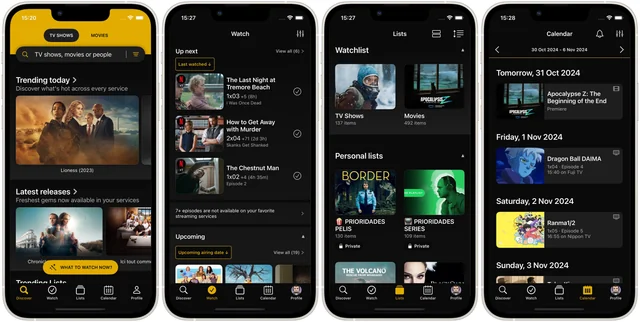
Sofa Time aims to address this challenge by providing a dedicated space for organising movies and television shows independently of individual streaming platforms. The app allows users to track completed titles, manage watchlists, record ratings and follow upcoming releases from one interface.
Rather than replacing streaming subscriptions, the platform works as a companion for people who want greater control over their entertainment history. It also offers discovery tools that help users find titles, check streaming availability and explore recommendations.
The app has attracted attention from viewers looking for an alternative to established tracking services. According to the supplied information, Sofa Time has received a 4.7 rating on Apple’s App Store and surpassed 50,000 downloads on Google Play.
Its import functionality is another important feature. Users can transfer viewing records from supported services, including TV Time, Trakt, IMDb and Letterboxd, making it easier to preserve years of tracking activity when changing applications.
With watchlists, viewing statistics, release calendars and personal ratings combined in one place, Sofa Time offers a practical option for viewers who want to organise their entertainment habits more efficiently.
What Is Sofa Time?
Sofa Time is a movie and television tracking application designed to help users manage what they are watching, what they have already completed and what they plan to watch in the future.
Unlike a streaming service, it focuses on organising viewing information rather than hosting the films and episodes themselves.
This distinction makes the app useful for people who subscribe to several entertainment platforms. Instead of maintaining separate watchlists, users can build a central catalogue of their viewing activity.
The app supports tracking at different levels, including individual movies, television series, seasons and episodes. Users can also record ratings and viewing dates to create a more detailed personal history.
For viewers with extensive watchlists, Sofa Time provides additional tools for sorting, filtering and discovering content.
1. Import Viewing History From Other Apps
One of Sofa Time’s notable features is its ability to import existing viewing records from supported tracking platforms.
Moving to a new application can be frustrating when years of ratings, watched episodes and personal notes are involved. Rebuilding that information manually may take considerable time.
Sofa Time supports imports from TV Time, Trakt, IMDb and Letterboxd, according to the supplied product information.
Its TV Time migration option accepts an official GDPR data export. The import can preserve supported information such as watched titles, viewing dates, ratings, episode reactions, favourite characters and comments with attached images.
This feature may appeal particularly to former TV Time users who want to retain their viewing history while moving to another tracker.
However, imported information can depend on the source export and the data supported by the destination app. Users should review their records after importing to ensure the transfer was successful.
2. Track Movies, Episodes and Viewing Progress
Sofa Time allows users to record their progress across movies and television series.
You can mark a film as watched, update the status of a series or track individual episodes. This level of detail helps viewers remember where they stopped watching, especially when following several shows simultaneously.
The app also supports different viewing statuses, including:
- Watching: For shows currently being followed.
- On Hold: For series temporarily paused.
- Dropped: For shows a viewer has decided not to continue.
- Completed: For titles that have been finished.
These categories reflect how people actually use watchlists. Not every show gets completed, and some series remain paused for months before viewers return to them.
The Up Next section also helps users identify shows they are actively watching, titles they have not followed recently and series they have yet to begin.
Together, these features make it easier to organise a large collection without relying on memory alone.
3. Discover Where Movies and Shows Are Streaming
A viewing tracker becomes more useful when it helps users find content rather than simply record what they have watched.
Sofa Time includes title pages that display streaming availability information and links to relevant services, according to the supplied details.
This can reduce the time spent searching through different streaming applications to determine where a particular film or series is available.
The app also includes discovery features such as trending titles, upcoming releases, currently airing shows and recommendations for similar content.
Users can explore public community lists and browse titles that match their interests.
Availability information can vary by country and change as streaming agreements evolve. Therefore, viewers should confirm availability and subscription requirements through the linked service before deciding where to watch a title.
4. Organise Watchlists With Personal and Smart Lists
Long watchlists can become difficult to manage, particularly when they contain hundreds of films and television series.
Sofa Time addresses this with personal lists that can combine movies and shows. Users can organise titles according to their interests, plans or viewing preferences.
For example, someone might create lists for weekend films, upcoming releases, documentaries or shows recommended by friends.
The app also offers Smart Lists and automatic lists that populate according to defined criteria. Saved filters make it easier to repeat searches without rebuilding them every time.
These tools are particularly useful for users who want more control over their entertainment library.
Instead of maintaining separate lists across different services, viewers can use one tracking environment to organise titles from multiple sources.
5. Follow Upcoming Episodes and Movie Releases
Keeping up with release schedules can be difficult when several television series are airing at the same time.
Sofa Time includes a calendar for tracking new episodes and movie releases. This provides a central view of upcoming entertainment rather than requiring users to check each title separately.
Premium subscribers can also access upcoming-release notifications, according to the supplied pricing information.
These features may help viewers plan their watchlists and remember when a new episode becomes available.
Release dates can change, however, and availability may differ between countries. Users should treat schedules as a guide and verify important dates when necessary.
6. Review Viewing History and Personal Statistics
Another feature is the app’s viewing logbook, which creates a record of watched movies and television episodes over time.
Users can look back at previous years and review what they watched, how many episodes they completed and which ratings they assigned.
Sofa Time also provides statistics covering total viewing time, viewing history by year, frequently watched content, favourite genres and rating distribution.
These figures offer a broader picture of personal entertainment habits.
For example, a viewer might discover which genres dominate their watchlist or identify periods when they watched more television than usual.
The statistics are primarily intended to help users understand their viewing history. They can also make it easier to revisit older favourites or identify patterns in entertainment preferences.
7. How Much Does Sofa Time Cost?
Sofa Time offers a free version and a Premium subscription with additional features.
According to the supplied pricing information, Premium has three payment options.
| Plan | Price |
|---|---|
| Monthly Premium | $1.99 per month |
| Annual Premium | $11.99 per year |
| Lifetime Premium | $29.99 one time |
The annual plan works out to approximately $1 per month when calculated across 12 months. The lifetime option involves a higher upfront payment but does not require recurring subscription payments under the stated offer terms.
The free version has several limits. These include two streaming services, two local lists, one saved filter and one connected service at a time.
Premium removes those limits and adds features such as automatic backups, upcoming-release notifications, multiple connected-service logins, exclusive themes and app icons, widgets, personal notes and a choice between heart and star ratings.
These features may be useful for people who manage extensive watchlists or regularly switch between streaming services.
Prices and feature availability can change. Check the relevant app store or the developer’s current pricing information before subscribing.
8. Who Should Use Sofa Time?
Sofa Time may be particularly useful for viewers who subscribe to multiple streaming services and want a single place to manage their entertainment history.
It could also appeal to people moving from another tracking app, thanks to its supported import options.
Users who enjoy organising films by genre, maintaining detailed watchlists or reviewing years of viewing statistics may find its tools valuable.
However, casual viewers who watch only a few shows may not need a dedicated tracker. The free version may also be sufficient for people whose tracking needs fall within its limits.
The decision to upgrade to Premium depends on how frequently you use the app and whether the additional features justify the cost.
9. Download Sofa Time on iOS and Android
Sofa Time is available for iOS and Android devices.
Users can explore the app through the official store listings:
- iPhone and iPad: Download Sofa Time from the Apple App Store.
- Android: Get Sofa Time on Google Play.
The supplied information also indicates that an Apple TV app is in development. Its release status should be confirmed through the developer’s official announcements.
Before installing the app, review its current features, permissions, subscription terms and recent user feedback.
Final Thoughts
Sofa Time offers a central solution for viewers who want to manage movies and television shows across multiple streaming platforms.
Its combination of viewing-history imports, episode tracking, personal watchlists, streaming availability, release calendars and viewing statistics goes beyond basic title cataloguing.
The Premium subscription may be worthwhile for users who need more lists, connected services and organisational tools. Meanwhile, the free version provides a way to explore the app before deciding whether an upgrade is necessary.
Ultimately, Sofa Time addresses a familiar problem: keeping entertainment organised when viewing activity is spread across several services. For people with extensive watchlists, it could make finding the next film or episode a more straightforward experience.