Mwafrikah
  • News
  • Business
    • Agribusiness
    • Money
  • Finance
  • Investment
  • Billionaires
  • Health
  • Lifestyle
    • Travel
  • Tech
  • Gadgets
  • Sports
No Result
View All Result
  • News
  • Business
    • Agribusiness
    • Money
  • Finance
  • Investment
  • Billionaires
  • Health
  • Lifestyle
    • Travel
  • Tech
  • Gadgets
  • Sports
No Result
View All Result
Mwafrikah
No Result
View All Result
ADVERTISEMENT
ADVERTISEMENT

How to Deposit Money from M-Pesa to KCB Bank Account

by kevin Atamba
July 3, 2025
in Finance
Mpesa To KCB Bank Account

Mpesa To KCB Bank Account

Summarize with ChatGPTShare to Facebook
ADVERTISEMENT

Transferring Money from M-Pesa to KCB Bank Account

As Kenya’s largest financial institution with over 15.7 million customers, Kenya Commercial Bank (KCB) offers seamless mobile money integration through its dedicated M-Pesa Paybill number.

ADVERTISEMENT

Why Choose KCB?

  • Established in 1896 with 250+ branches nationwide
  • Ranked as a Tier 1 bank by Central Bank of Kenya
  • Secure digital transactions with instant notifications

Step-by-Step Deposit Guide (2025)

  1. Access M-Pesa Menu
    • Dial *234# on your Safaricom line
  2. Select Payment Option
    • Choose “Lipa na M-Pesa”
    • Select “Pay Bill”
  3. Enter Payment Details
    • Business Number: 522522
    • Account Number: Your KCB account number
    • Amount: Enter desired deposit figure
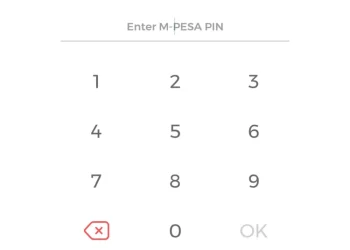
  4. Authorize Transaction
    • Input your M-Pesa PIN
    • Confirm by pressing OK
  5. Receive Confirmations
    • Instant SMS from M-Pesa
    • Notification from KCB confirming deposit

Key Requirements

✔ Active M-Pesa account with sufficient balance
✔ Registered KCB bank account
✔ Correct Paybill number (522522)


Transaction Limits & Charges

Transaction Range (KSh)M-Pesa Charges
1 – 49Free
50 – 1,00010
1,001 – 2,50025
2,501 – 5,00045
5,001 – 10,00060

Maximum daily limit: KSh 150,000


Troubleshooting Tips

  • Failed transactions? Wait 5 minutes before retrying
  • Wrong account number? Contact KCB immediately
  • No confirmation SMS? Check transaction history via *234#

KCB Customer Support

Phone:

ADVERTISEMENT
  • +254 20 327 0000
  • +254 732 187 000
  • +254 711 087 000

SMS: 22522
Email: [email protected]

Branch Locator: www.kcbbankgroup.com

READ MORE:Central Bank of Kenya (CBK) Branches

Tags: KCB Bank M-PesaKCB Paybill numberM-Pesa to KCB depositMobile banking KenyaSend money to KCB
ADVERTISEMENT
Previous Post

Central Bank of Kenya (CBK) Branches

Next Post

List of Kenya Commercial Bank (KCB) Branch Codes

Related Posts

NSSF Contribution Rates Kenya Guide
Finance

NSSF Contribution Rates Kenya Guide

4 weeks ago
Farmer Based Organization Fund Application Guide
Finance

Farmer Based Organization Fund Application Guide

3 months ago
KRA
Finance

KRA’s Nil Returns Reinstated with New Validation Checks: What Taxpayers Need to Know

3 months ago
M-Shwari Tightens Loan Recovery With National ID Tracking
Finance

M-Shwari Tightens Loan Recovery With National ID Tracking

3 months ago
Debate Grows Over M-Pesa Duress PIN Proposal
Finance

Debate Grows Over M-Pesa Duress PIN Proposal

3 months ago
Apple Pay
Finance

Apple Pay’s Growth Slows as Competitors Like Google Pay and PayPal Gain Ground

6 months ago
Next Post
Kenya Commercial Bank (KCB)

List of Kenya Commercial Bank (KCB) Branch Codes

Kenya Commercial Bank (KCB)

The Complete List of KCB Bank Branches in Kenya

ADVERTISEMENT
  • About Us
  • Privacy
  • Terms
  • Contact Us
  • Partner

© 2026 Mwafrikah Designs

No Result
View All Result
  • News
  • Business
    • Agribusiness
    • Money
  • Finance
  • Investment
  • Billionaires
  • Health
  • Lifestyle
    • Travel
  • Tech
  • Gadgets
  • Sports

© 2026 Mwafrikah Designs