Experiencing a sudden YouTube termination represents one of the most terrifying moments a digital creator can face in their online career. When the platform pulls down a channel, the content owner loses far more than just published video files and public commentary. In a single instant, years of diligent audience building, curated playlists, and hard-earned subscriber counts vanish without advance notice. Furthermore, because Google ties platform channels directly to broader master account infrastructure, losing a channel locks the creator out of establishing replacement channels under that primary login. Understanding the exact mechanics behind these severe enforcement actions is essential for anyone who relies on video broadcasting for brand visibility, creative expression, or personal livelihood.
While account shutdowns feel completely overwhelming, panic often leads creators to make critical errors during their initial recovery attempt. Many affected users immediately submit rushed, emotional appeals or attempt to delete flagged video assets, which frequently damages their ultimate chances of account reinstatement. Instead, the video platform relies on a structured, deliberate review pipeline designed to separate automated false positives from genuine policy breaches. Because copyright strikes and Community Guideline penalties follow entirely different administrative paths, creators must identify the specific reason behind the enforcement action before submitting any official documentation or contacting technical support agents.
Navigating this formal review process requires patience, strict attention to detail, and a clear understanding of digital broadcasting policies. Whether an account closure stems from automated spam detection, severe policy violations, or stacked copyright claims, creators retain a legitimate opportunity to present their case clearly. By gathering concrete evidence, submitting detailed explanations through YouTube Studio, and leveraging official escalation pathways, account owners can work systematically toward restoring their lost broadcasting privileges. This comprehensive guide breaks down the exact steps necessary to navigate a severe account suspension, overcome common technical hurdles, and regain control of your online presence.
Navigating the Appeal Process After a YouTube Termination
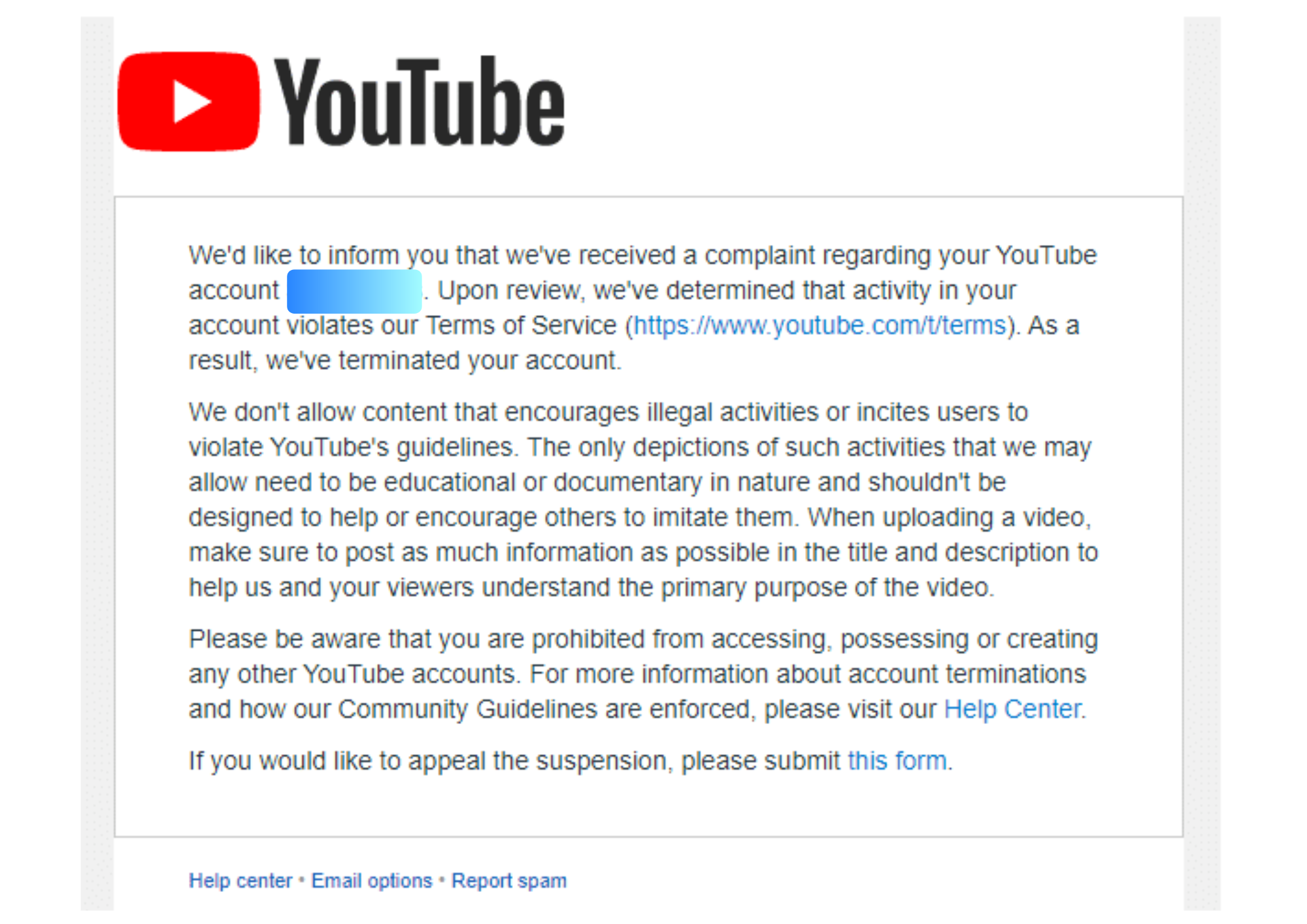
When an account closure occurs, YouTube sends an official notification email directly to the inbox connected to the account. This initial message is vital because it explicitly specifies whether the shutdown resulted from three accumulated copyright strikes, severe policy abuse, or automated system flagging. Creators should read every line of this notification carefully before opening YouTube Studio on a desktop web browser.
To initiate the formal appeal, log into the affected Google Account and navigate to the main YouTube Studio page. Look for the termination notification banner and select the option to begin the official review process. When filling out the appeal form, focus on providing specific, factual details regarding your content and creative methods. Avoid general statements or emotional arguments, as human reviewers require concrete context to evaluate whether an administrative error occurred.
Once submitted, simple automated errors move relatively quickly through the review queue. However, complex cases involving copyright disputes, monetization flags, or previous enforcement actions route through specialized review teams and take longer. Creators should refrain from filing multiple duplicate appeals, as resubmissions often stall the processing queue rather than speed up the final verdict.
Resolving Copyright Issues vs. Standard Policy Disputes
A standard administrative appeal will not resolve an account closure caused primarily by copyright strikes. Because copyright claims fall under federal legal frameworks, creators must submit a formal counter-notification rather than a general policy appeal. Filing a counter-notification initiates a legal dispute process, which signals to YouTube that you hold the legal rights, licenses, or fair use justification for the material in question.
Before initiating a formal legal counter-notification, contacting the copyright claimant directly often yields faster and cleaner results. If the copyright owner agrees to retract their claim, YouTube will automatically remove the strike from your account history. Creators have up to one full year from the enforcement date to submit an official appeal. However, taking action immediately yields significantly higher success rates, as gathering source video files, production notes, and contextual proof becomes increasingly difficult as time passes.
Managing Monetization and Partner Program Suspensions
Losing access to the YouTube Partner Program presents a distinct set of challenges compared to a complete channel shutdown. The platform often provides advance notice for monetization violations, giving creators a seven-day window to file an appeal before advertising revenue pauses. If you miss this initial window, you still retain a 21-day period to submit your case after the suspension officially takes effect.
Fixing channel issues prior to appealing is essential, but creators must avoid deleting flagged content after receiving a notice. Removing videos prevents reviewers from verifying the full context of your work and usually leaves the suspension in place. Reviewers evaluate the channel in its exact state when the notice was originally issued. Partner Program appeal reviews typically take approximately two weeks to process.
If an appeal regarding monetization gets rejected, the decision remains final for a set period. However, creators can reapply to the Partner Program 90 days after the initial suspension date. Maintaining a clean channel history for three consecutive months without new policy infractions allows creators to regain monetization eligibility through standard application channels.
Practical Strategies for Successful Channel Recovery
To maximize the chances of a successful appeal, creators should leverage every tool available within the platform ecosystem. When appealing a decision regarding reused or repetitive content, utilizing the video appeal option allows you to record a short walkthrough demonstrating your unique editing process and creative workflow. Showing raw footage or editing timelines provides powerful context that text explanations cannot match.
Reaching out through public social channels can also help creators secure a manual review. Contacting the official support handle on social media with your channel ID sometimes highlights cases where automated systems made an error. Furthermore, creators must ensure their primary Google Account remains secure, as a compromised or locked master login will prevent any YouTube appeal from proceeding. Always document every notification email, timestamp, and appeal confirmation to build an organized paper trail.